

How To Create Pdf Photoshop
Are you looking how to create multi page PDF? However you want it as one PDF but kept in a multi page format?
Don't worry, it's really simple when you know-how. I was also looking for a solution a while ago and couldn't easily find the answer. Adobe is always keen to limit the ability to edit or flexibly produce PDFs without purchasing one of their products. I found myself trying to find how to create multi page pdf's and never getting it looking the way I wanted it.
The challenge is knowing where this facility is. Adobe does actually allow you to create a multi page PDF using Adobe Photoshop, however, it will take some time to discover it. So this is where my guide should help.
How to make a multi page pdf in photoshop
After looking for some time I'm pleased to provide you with the easiest way I found to make photoshop pdf multiple pages in one easy tutorial
Time needed:5 minutes.
How do I make multi page PDF in Photoshop?
- Open Bridge
Open Photoshop and launch the bridge.
- Select Multiple PDF's
Choose the PDF's you want to combine into a single PDF.
- Select Output
In Bridge, choose the layout for your PDF filel.
- Save
That's it, save your multiple page PDF in Photoshop CS5
How do you make a multi page PDF with photoshop?
If you have CS5 you will need to open bridge and follow our instructions. If you have CS4 or CS6 onward then use the native save or export option.
Can I make a high definition multiple page pdf in Photoshop CS5?
Yes you can. The key is to not save individual PDFs, but save individual PSDs. Then import the PSDs in bridge and follow our 4 step guide. See the video below.
How to create a pdf in photoshop
If you just want a simple one page PDF, then just go to "Save AS" in photoshop and choose PDF as the file format.
Initially, you may have tried Trevor Morris' Layers to Comps script and then you realise it doesn't work with your CS5. So this article is for you. I discovered this method as no one else had a simple free answer. I hope it works for you too. Let me know if not.
If you have Photoshop CS5 then this is how to create the multi page PDF in 4 Steps.
- 1. Create your individual PDFs pages in Photoshop CS5 and save as . PDF file.
- 2. Open Adobe Bridge. Click on Browse and locate the PDFs from step 1
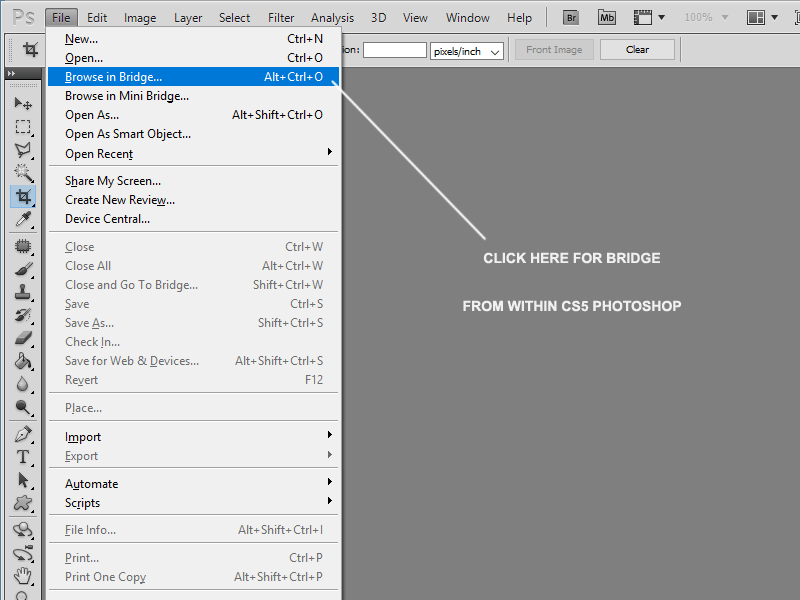
- 3. Click on the Output Link. Once Bridge is open, click on the Output link at the top area.
- 4. In Bridge, choose how it should Output and then save.
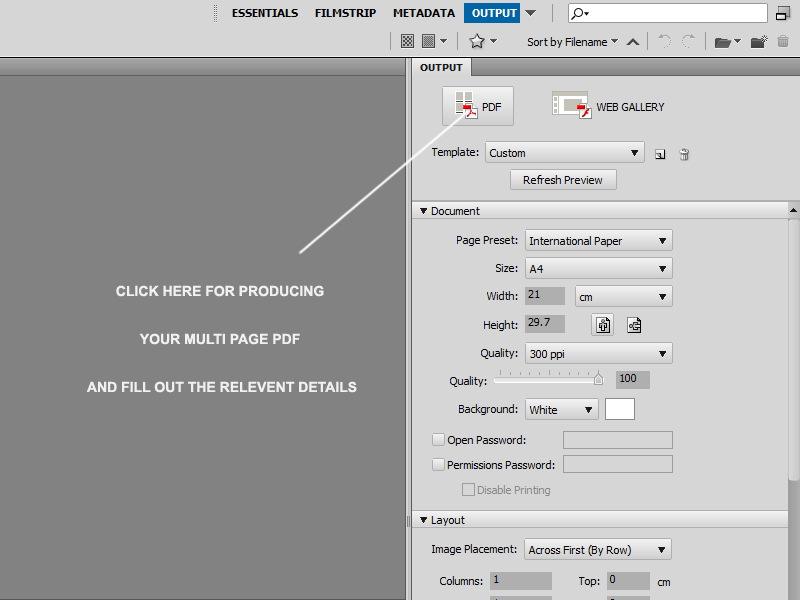
Choose Output settings
That's it, you should now have a multi-page PDF using CS5 Photoshop. I found the results were so good that I now use this method to send to all my potential clients and for reports and quotes. Now you know how to make a multi page pdf let me know how you got on. Of course, if you want me to do this on your behalf I'm currently available for hire on Zanet Design Quote.
How To Create Pdf Photoshop
Source: https://zanet.co.uk/create-a-multi-page-pdf-in-photoshop-cs5/
Posted by: meachamdiesse.blogspot.com
0 Response to "How To Create Pdf Photoshop"
Post a Comment